How to Use the Dripfeed Feature – Step-by-Step Guide | FalconSMMPanel
Published article from FalconSMM Blog
📰 About this post
FalconSMM updates, guides, and news — stay informed about our latest tools, features, and improvements.
How to Use the Dripfeed Feature on FalconSMMPanel
Dripfeed lets you send followers, likes, or views gradually instead of instantly — making growth natural and safe.
💡 Example
Want 1,000 followers? → Send 100 followers per day for 10 days using Dripfeed.🔹 What Is Dripfeed?
Dripfeed means gradual delivery. It splits your order into several parts and repeats them at fixed time intervals.
- Platform Safety: No sudden spikes.
- Organic Growth: Looks natural.
- Automation: Set once, runs automatically.
🔹 How Dripfeed Works
You choose how many times the order repeats and how many minutes between each run.
Formula
Total = Quantity per Run × Number of Repeats Example: 100 likes × 10 = 1,000 likes🔹 Step-by-Step: How to Create a Dripfeed Order
- Login to FalconSMMPanel.
- Open New Order.
- Select service category.
- Enter quantity per run.
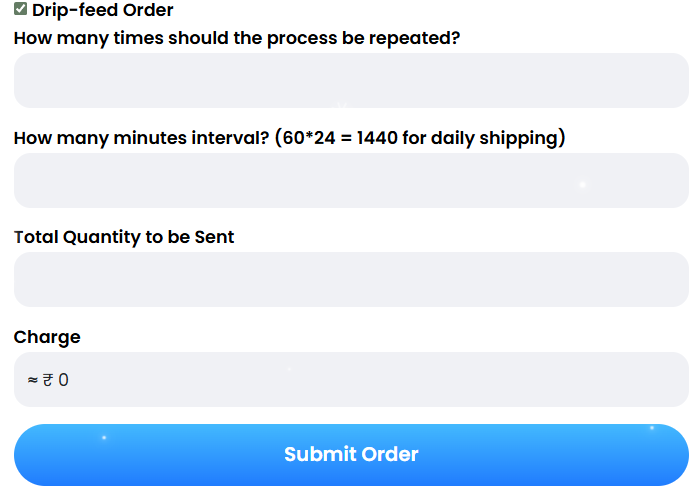
- Enable Drip-feed Order.
- Enter repetitions (e.g., 10).
- Set interval in minutes (1440 = 1 day).
- Check total & charge.
- Click Submit Order.
🔹 Understanding Each Field
- Repetitions: Number of runs.
- Interval: Time between runs.
- Total Quantity: Final count delivered.
- Charge: Automatically calculated.
⚠️ Important
Dripfeed orders cannot be stopped once started. Double-check details before submitting.🔹 Why Use Dripfeed?
- More natural and believable growth.
- Avoids sudden jumps in engagement.
- Ideal for influencers & agencies.
- Better long-term stability.
🔹 Pro Tips
- Use 60–1440 minute intervals.
- Do not run multiple Dripfeeds on the same link.
- Check balance before long campaigns.
Dripfeed helps you grow safely and strategically — perfect for long-term social media growth.